
Have you ever landed on a website and felt a tiny jolt of doubt because your browser flashed “Not Secure”? Even if you didn’t say it out loud, your brain probably did the math instantly: If this site can’t protect my information, why should I trust it?
That’s the reality of the modern internet. People move fast, attention spans are short, and trust is fragile. If your website doesn’t feel safe, visitors won’t stick around long enough to read your content, sign up, or buy from you.
The good news? Fixing that trust gap is simpler than most people think. It starts with one powerful upgrade: an SSL certificate (HTTPS).
In this guide, you’ll learn what SSL certificates are, why HTTPS matters, how it works, and how you can set it up properly—without getting lost in confusing tech jargon.
What Is an SSL Certificate (HTTPS)?
An SSL certificate is a digital security file that protects the connection between your website and your visitors. When your site has SSL installed, your web address changes from:
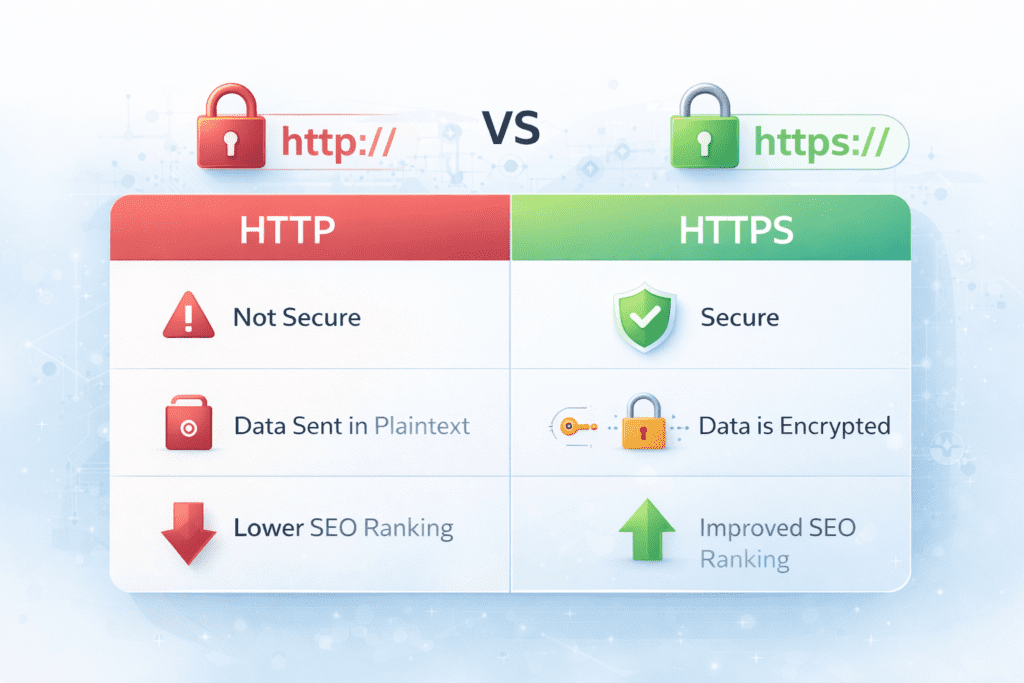
- http:// → https://
That little “S” stands for Secure, and it’s a big deal.
SSL Certificate Meaning (In Plain English)
When someone visits your site, they may type in personal information like:
- passwords
- email addresses
- payment details
- contact form messages
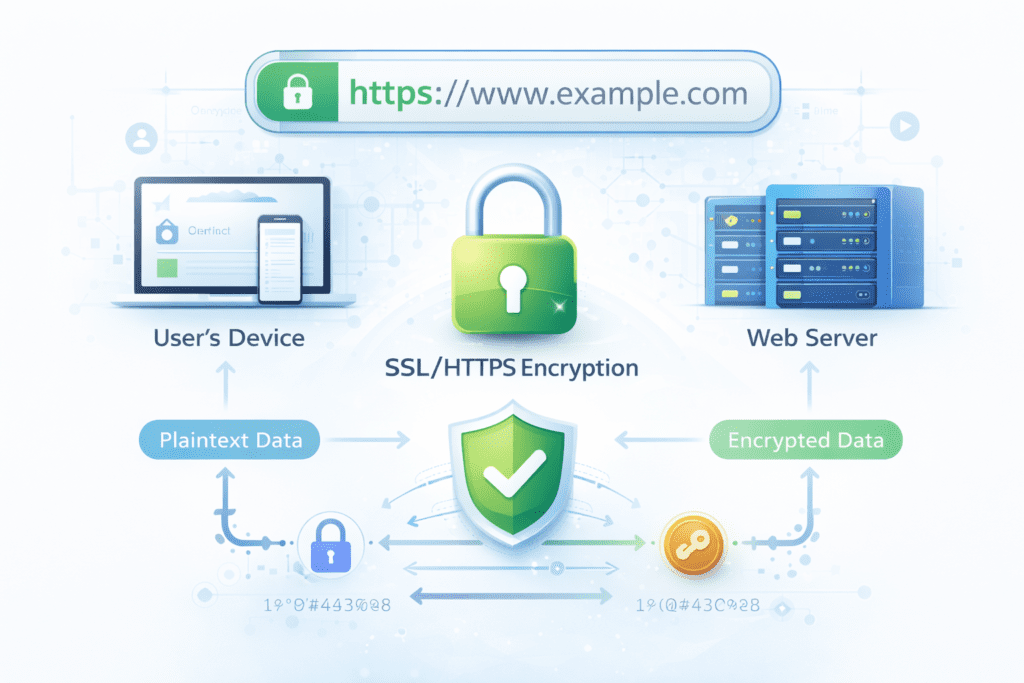
Without SSL, that data can be exposed while it travels between their browser and your server. With SSL, the information is encrypted, meaning it becomes unreadable to anyone trying to intercept it.
What Does HTTPS Stand For?
HTTPS means HyperText Transfer Protocol Secure. Think of it like sending a private message in a locked envelope instead of writing it on a postcard that anyone can read.
Why SSL Certificate (HTTPS) Is Important for Every Website
Even if you’re not running an online store, SSL still matters. In fact, it affects more than security—it touches your reputation, your traffic, and your conversions.
1) SSL Builds Trust Instantly
People judge your website in seconds. If they see a padlock icon in the address bar, they feel safer. If they see warnings, they hesitate.
And hesitation online usually leads to one thing: leaving.
When your site runs on HTTPS, you send a clear message:
“You’re safe here.”
2) SSL Certificate (HTTPS) Helps Your SEO
Google has openly encouraged HTTPS for years, and secure websites tend to perform better in search results. Why? Because Google wants to recommend sites that protect users.
So if you’re working hard on content and backlinks but still losing ground, missing HTTPS could be part of the problem.
3) SSL Protects Your Visitors (And Your Brand)
Even one security incident can damage your credibility. SSL helps reduce the risk of data leaks, impersonation, and “man-in-the-middle” attacks.
It’s not just about protecting users—it’s about protecting your name.
How SSL Certificate (HTTPS) Works
You don’t need to be a developer to understand this. Here’s the simple version.
SSL Handshake Explained
When someone visits your HTTPS site, a quick background process happens:
- Your visitor’s browser asks your server for a secure connection
- Your server sends your SSL certificate
- The browser checks if it’s valid and trusted
- They agree on encryption keys
- A secure session begins
This all happens in milliseconds. Your visitor won’t notice it—but they’ll benefit from it.
What SSL Really Provides
SSL gives you three important protections:
- Encryption: Keeps data private
- Authentication: Confirms your website is real
- Integrity: Prevents tampering during transmission
Types of SSL Certificates (HTTPS)
Not every SSL certificate is the same. The right choice depends on what kind of website you run.
Domain Validation (DV) SSL Certificate
This is the most basic type.
Best for: blogs, portfolios, small websites
Pros: fast, affordable, often free
Cons: only verifies domain ownership
Organization Validation (OV) SSL Certificate
This certificate verifies your business identity as well.
Best for: business websites, service providers
Pros: more credibility than DV
Cons: takes longer to issue
Extended Validation (EV) SSL Certificate
EV is the highest level of validation.
Best for: banks, large companies, high-trust industries
Pros: maximum verification
Cons: more expensive and strict requirements
Wildcard SSL Certificate
If you have multiple subdomains, this saves time.
Example: blog.yoursite.com, shop.yoursite.com, mail.yoursite.com
A wildcard covers: *.yoursite.com
Multi-Domain (SAN) SSL Certificate
This one covers multiple domains under one certificate.
Best for: agencies, businesses managing several brands
How to Get an SSL Certificate (HTTPS)
You have two main options: free SSL or paid SSL.
Free SSL Certificate Options
Many hosting companies include free SSL through Let’s Encrypt, which is widely trusted.
Free SSL is great if you:
- run a small site
- don’t need business validation
- want basic encryption
Paid SSL Certificate Options
Paid SSL certificates often include:
- stronger validation options (OV/EV)
- customer support
- warranties
If you’re running an online store or handling sensitive customer data, paid SSL can be worth it.
Popular providers include:
- Let’s Encrypt
- Cloudflare
- DigiCert
- Sectigo
- GoDaddy
How to Install SSL Certificate (HTTPS) on Your Website
In many cases, installation is easier than you expect—especially if you’re using WordPress or a good hosting provider.
Common SSL Installation Methods
You can install SSL through:
- your hosting dashboard (like cPanel)
- Cloudflare (if you use it)
- manual server installation (for advanced setups)
Basic SSL Installation Steps
Here’s the general process:
- Generate a CSR (Certificate Signing Request)
- Issue or purchase your SSL certificate
- Install the certificate files on your server
- Enable HTTPS on your domain
- Test everything to make sure it works
Pro tip: After installing, test your SSL setup using an SSL checker tool like SSL Labs.
How to Redirect HTTP to HTTPS Properly
Installing SSL is only half the job. You also need to make sure your entire site uses HTTPS.
Why Redirecting Matters
If some pages still load on HTTP, you can run into issues like:
- duplicate pages in Google
- mixed content warnings
- lost SEO value
Best Way to Redirect
You want a 301 redirect, which tells search engines the move is permanent.
Depending on your setup, you can do this using:
.htaccess(Apache servers)- NGINX config
- WordPress plugins
Common SSL Certificate (HTTPS) Errors & How to Fix Them
Even with SSL installed, you might see warnings. Don’t panic—most fixes are straightforward.
“Your Connection Is Not Private”
This usually happens because:
- your certificate expired
- the wrong certificate is installed
- your device time/date is incorrect
Mixed Content Warning
This means your page loads securely, but some elements still use HTTP, such as:
- images
- scripts
- stylesheets
Fix it by updating all links to HTTPS.
SSL Certificate Expired
If your SSL expires, browsers may show scary warnings. Renew it immediately and enable auto-renew if possible.
SSL Certificate (HTTPS) Best Practices
If you want your site to stay secure long-term, follow these habits:
- renew certificates early (or use auto-renew)
- update your CMS and plugins
- run regular security checks
- use modern TLS settings
- keep backups
Security isn’t something you “set and forget.” It’s something you maintain—like locking your doors at night.
Quick SSL Certificate (HTTPS) Checklist
Use this to confirm you’ve done everything right:
- ✅ SSL installed and active
- ✅ HTTPS working on all pages
- ✅ 301 redirects from HTTP to HTTPS
- ✅ no mixed content errors
- ✅ internal links updated
- ✅ certificate renewal set up
FAQ About SSL Certificate (HTTPS)
What is an SSL certificate (HTTPS) and why do you need it?
An SSL certificate (HTTPS) encrypts the connection between your website and visitors, protecting sensitive data and increasing trust.
Is SSL certificate (HTTPS) free?
Yes, you can use free SSL certificates like Let’s Encrypt. Many hosting companies include it automatically.
Does SSL certificate (HTTPS) improve SEO?
Yes. HTTPS supports better rankings because Google favors secure, user-friendly websites.
Can one SSL certificate (HTTPS) cover multiple domains?
Yes. A multi-domain (SAN) SSL certificate can secure multiple domains under one plan.
What happens if your SSL certificate (HTTPS) expires?
Your visitors may see browser warnings, and you could lose traffic, leads, and sales quickly.
Conclusion: Your Website Deserves to Be Trusted
An SSL certificate (HTTPS) is one of the simplest upgrades you can make, but it delivers massive benefits: stronger trust, better security, and improved SEO potential.
If you want people to stay on your site, share their information, and buy with confidence, HTTPS isn’t optional anymore—it’s the standard.
Ready to Secure Your Site?
Now it’s your turn: check your website right now.
Does it show HTTPS and a padlock icon?
If not, take action today—install an SSL certificate, force HTTPS, and make your site feel safe the moment someone lands on it. And if you want, tell me what platform you’re using (WordPress, Shopify, Wix, custom site), and I’ll guide you through the best SSL setup for your situation.
you can buy a hosting plan with Free domain and FREE SSL from Hostinger
see also:
Best Web Hosting for Beginners (2026 Guide): Start a Website Without StressHostinger vs Bluehost (2026 Comparison): Which One Is Better for Beginners?